Dietary Requirement Propagation as a Software Buying Criterion for Serious Wedding Planners
Test a wedding platform's dietary data flow before committing to it.
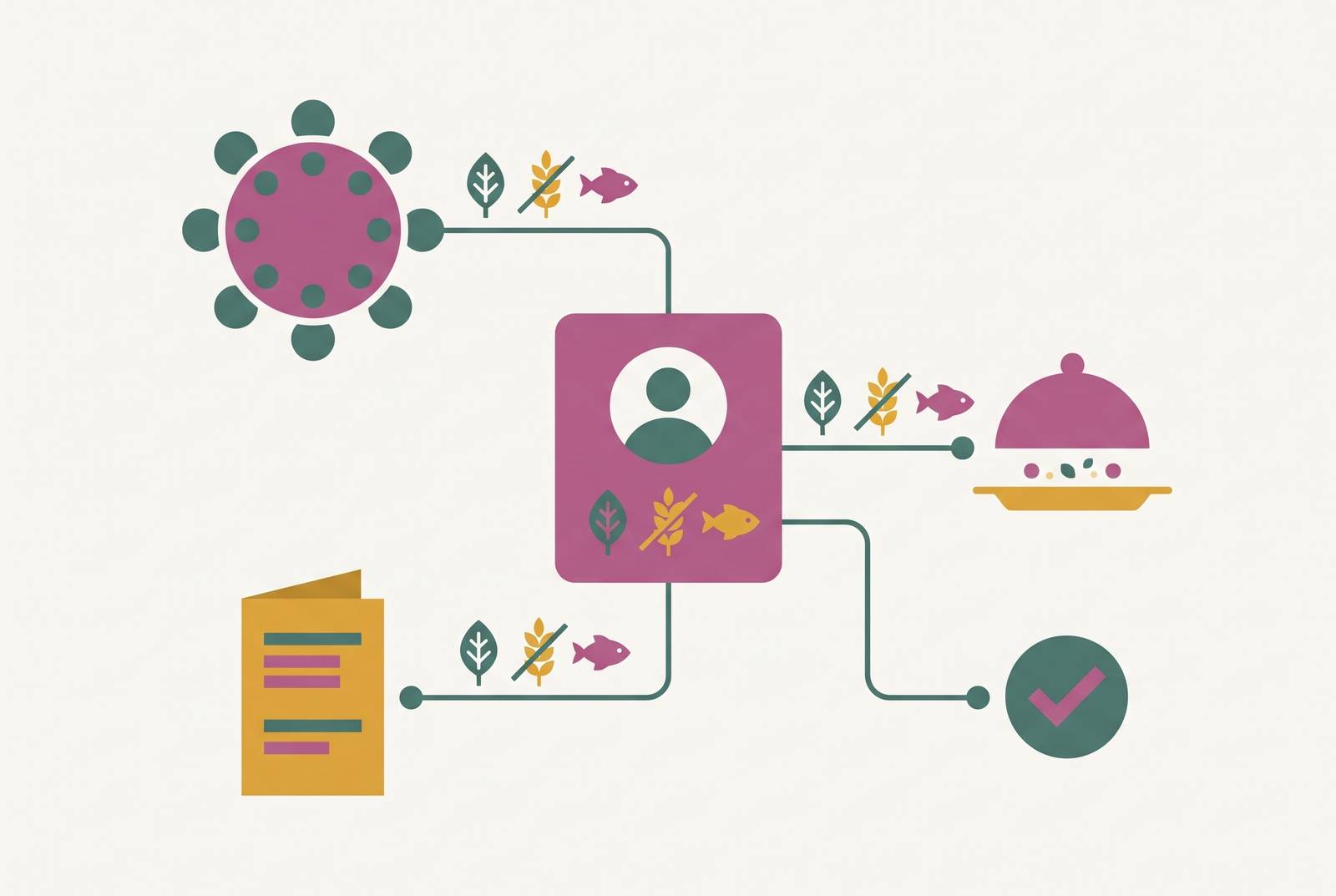
Dietary requirements are a revealing software buying test for serious wedding planners. If a guest’s dietary needs cannot move from RSVP to seating chart, table card and caterer export without being typed again, the platform leaves the hardest reconciliation work to the couple. Testing that chain before committing is more useful than counting features.
Why dietary requirements are the hardest data problem in wedding logistics
The dietary spreadsheet says one thing, but the seating chart says another on the morning of the wedding. A guest has moved tables, their dietary note has stayed behind, and the caterer’s sheet no longer matches the room. Both documents may look complete on their own. The failure sits between them, where a change in one tool never reached the other. That gap is what makes dietary handling such a sharp test of planning software.
A dietary requirement has to reach a physical plate. Unlike a contact detail, it affects the caterer’s prep quantities, the dietary load at each table, the table card legend and the day-of run sheet. A name or table number helps identify someone, but the dietary requirement also changes what must be prepared and served. Accuracy therefore depends on more than collecting a correct answer once. The answer must stay with the right guest through every change that follows.
This is both a data problem and an organisational one. A careful couple can keep several documents aligned, but disconnected tools make that alignment a separate job. Each seating revision creates another point where the records can diverge. The software’s real value lies in removing that repeated work.
How the data gap opens between RSVP collection and the caterer's kitchen
The chain has four handoffs, which are RSVP to guest list, guest list to seating chart, seating chart to table cards, and seating chart to caterer export. When the tools are not connected, someone has to type the data again at each handoff. The first copy may be entirely correct. The problem begins when the original information changes and the copied versions do not change with it.
A guest might amend their dietary requirement after responding, or a plus-one might be added late. Those changes affect who needs which meal. A table reshuffle creates a different kind of update, because the requirement stays the same while its location changes. If the guest list and seating chart are separate, someone must bring both up to date with both kinds of change before making the caterer’s sheet. Updating only the overall meal totals does not repair the table assignments.
The revision cycle makes this harder to control. Couples change seating charts many times before settling on where everyone will sit, while caterers in Australian capital cities usually need final numbers and dietary breakdowns one to two weeks before the event. Bespoke Catering Sydney’s contract terms require final numbers seven days before the event. When the final export must be reconstructed from a second source, an error introduced weeks earlier can reach the kitchen undetected. The deadline does not fix the gap.
At that point, the consequences move beyond administration. A wrong meal creates a day-of incident and may lead to a cost dispute with the caterer. Resolving what was requested, recorded and supplied is harder after the event than correcting the breakdown beforehand. Integration is therefore a structural requirement for this workflow.
What genuine dietary propagation looks like end-to-end in a connected platform
A connected platform stores dietary requirements as a structured part of each guest’s record. That distinction governs what happens downstream. A structured tag can appear in a seating view or contribute to a meal total without someone interpreting and copying it. Free text still has a role, especially for allergy details, alongside the tags.
At collection, the RSVP form captures selectable dietary categories for each guest and each plus-one. The guest list updates as responses arrive. That gives later stages a shared record to draw from, rather than a set of answers that must first be transferred elsewhere. When a guest changes a requirement, the connected views should reflect the amendment. The planner should not have to repeat the change.
At the seating stage, each table shows its dietary load at a glance, including vegetarian, gluten-free and halal meals. Moving a guest therefore updates the breakdown for the tables involved without someone having to check a separate spreadsheet. The caterer export then includes meal choice and dietary tags per guest, with totals per table and across the wedding. Chicken, fish, vegetarian and GF counts still show, and the CSV carries the free-text allergy notes too.
Table cards complete the physical end of the chain. The strongest floor-plan tools connect guest information including starter, main, dessert, allergy and dietary needs, then export it in one click for sharing with the venue. The card reflects the same guest data used for the caterer’s output. One guest record supplies what each downstream view needs, so each detail only has to be collected once.
Using dietary propagation as a buying test before committing to a platform
The practical buying test belongs in a free trial, before the full guest list moves into the platform. Enter a guest and a plus-one, and use the RSVP form to record their dietary needs. Are there selectable categories for each person, or only a blank box? A free-text-only field signals that downstream use has not been properly addressed, even if it looks flexible at first.
Next, test a change after the initial response. Amend the guest’s dietary requirement and open the seating chart to see whether it updates automatically. This is the decisive handoff to inspect. If trial access does not allow the test, ask explicitly whether an amended RSVP changes the dietary information in the seating view. “Dietary tracking” on a feature page does not answer that narrower question.
Then generate the caterer export from the trial data. It should list requirements per guest and total them per table in a single action, with the amended requirement included. A workaround or a second tool means the chain has broken. The test exposes behaviour that a list of separate features cannot show.
The strongest objection is that a dedicated seating tool can fill the planning app’s gap. It can make seating and exports better. But dietary data gathered elsewhere still has to be brought into that tool, and any later change has to be brought across too. For weddings with severe allergies, halal or kosher requirements, moving that data by hand is too much of a risk. A better final document does not remove the risk in how its contents arrived.
How Australian planning tools handle — or break — the dietary chain
Australian couples can choose between tools built to help them find vendors and tools built to handle their planning data. Neither capability proves the other is present. For dietary work, the relevant question is how information moves through the planning workflow, rather than how many other wedding tasks appear in the menu.
Lovely Seating tracks guest name, family group, RSVP status, table and seat assignment, meal choice, dietary needs and accessibility needs. It can export floor-plan seating charts, an A–Z guest finder, table-by-table lists, table cards and table numbers. It also provides a meal directory for the caterer, place cards, a welcome sign and a CSV guest spreadsheet. Those outputs address the last mile in detail. Its Pro tier uses a one-time payment per wedding and unlocks print-ready exports and a Find Your Seat QR page.
EventDiagram has a column for each guest’s meal choice and shows chicken, fish, vegetarian and GF totals for each table. It uses free-text notes for allergies. The dietary data travels with the CSV export handed to the caterer, so the output retains the meal information held in the seating tool. That is a specific strength at the seating-to-kitchen handoff. It does not, by itself, establish a connection to an RSVP system used elsewhere.
The trade-off is manual transfer at the front. When a dedicated seating tool sits beside another planning platform, dietary information collected in that other system must be moved across. These tools can solve the output problem without solving the whole propagation problem. Their merits should be judged at the stage they handle, while the buying test follows the record from its original entry. Good last-mile functionality and an unbroken end-to-end chain are different claims.
Why the financial stakes of Australian catering make dietary accuracy a budget instrument
With Australian caterers charging per head, the details in a guest record affect the bill. A wrong meal or an uncommunicated requirement can create both a service problem and a potential dispute over costs. The expense is not confined to an extra plate. A last-minute correction may require renegotiation, while an after-event disagreement is harder to resolve than an accurate breakdown supplied before the deadline.
Headcounts add another layer of financial leverage. Adding or removing a group of guests changes the catering bill substantially, so the RSVP-to-caterer flow also supports control over final numbers. A late plus-one is not only a seating adjustment. Their attendance and dietary needs both belong in the final breakdown used by the caterer. Keeping those details connected makes the guest record a budget instrument as well as a logistics record.
An alternate-drop menu with several dietary variants is priced differently from a single menu with individual dietary plates. That distinction can disappear when couples compare headline menu prices without surfacing the required variations. Software that shows the dietary mix while couples compare vendors helps them spot the price difference before the final invoice.
Seeing those costs early helps because Australian couples consistently spend more than they first budgeted. Hidden costs such as cake cutting fees, corkage and vendor meals add to that overspend. A dietary error requiring last-minute renegotiation adds to it. Connected dietary records cannot eliminate every source of overspend, but they address one avoidable source of uncertainty while catering decisions are still open.
What a free plan should handle and when paying for dietary infrastructure is justified
A free plan’s minimum dietary scope is straightforward. It should collect structured dietary tags at RSVP, bring those tags into a seating view and export a caterer-ready list. These are connected parts of one job. Collecting the data for free only helps so much if someone still has to piece it together by hand for the kitchen’s breakdown. A break at any stage shifts the unfinished work back to the couple.
For a smaller wedding with little dietary variety and a stable guest list, a free plan that completes that chain is sufficient. Paying is not proof of better integration. Paying starts to make sense when the number of guests, the range of dietary needs or the seating plan makes keeping separate records in step by hand too risky. At that point, the useful purchase is infrastructure that keeps requirements attached to guests through revisions. The same trial test applies at either price.
For Australian couples, the payment model also deserves attention. A subscription charges across the planning period regardless of whether advanced features are being actively used. A one-time or free-to-start model lets couples pay when they need the relevant capability. That makes timing part of the buying decision, rather than treating every month of planning as the same workload. A paid plan earns its place when it removes a risky handoff at the point the wedding needs it.