Data Re-Entry Cost Across Separate Wedding Planning Apps
Manual re-entry between wedding apps costs time, errors, and stress across the planning journey.

A common scenario in wedding planning: an RSVP change gets recorded in one tool, but the seating chart in a separate app never gets updated. The two records drift apart, and nobody flags the mismatch until it matters.
That gap between "I entered this once" and "I have to enter it again, somewhere else" has a name in operations circles: re-entry. It's the manual work of moving the same piece of information, a name, a dietary flag, a phone number, from one system into another because the two systems don't talk to each other. Wedding planning in Australia runs on re-entry constantly, and almost nobody planning a wedding has ever heard the term. Naming it is the first step to seeing how much it actually costs.
What re-entry costs: time, errors, and stress as measurable categories
Break the cost into three buckets, because each behaves differently.
Time cost is the easiest to picture. Every handoff between two tools means someone sits down and retypes what already exists somewhere else. A 2026 industry source reports that professional wedding planners running manual systems, juggling a CRM, client documents, and separate finance trackers across many weddings at once, spend more than 10 hours a week on duplicate data entry alone. That's a planner managing a full client roster, so the number won't map onto one couple planning one wedding. But the shape of the problem is identical, just scaled down: a couple isn't losing a workday every week, but across a six- to twelve-month engagement, the hours add up into something real. A few minutes per guest, per handoff, multiplied across a large guest list, stops being trivial.
Error cost matters more than time cost because errors don't announce themselves: a dietary requirement that gets typed once into an RSVP form and never makes it to the caterer's list, a guest counted twice, or a plus-one who never makes it onto the seating chart can go unnoticed for months. Every re-entry is a chance for something to slip: a dietary requirement that gets typed once into an RSVP form and never makes it to the caterer's list, a guest counted twice because they appear in two spreadsheets under slightly different name spellings, a plus-one who accepted late and never made it onto the seating chart. These mistakes sit quietly for months. A gluten-free guest getting a regular meal, or a guest arriving to a seat that doesn't exist, becomes visible only on the morning of the wedding.
Stress cost is the hardest to put a number on but probably the most corrosive. Keeping parallel records across multiple apps means holding a mental map of what's current where: is the guest count in the budget spreadsheet up to date, or did five people RSVP no since the last time anyone opened it? Planning guidance consistently points to a single-system approach as one of the most effective ways to reduce stress across the engagement period. No re-entry, no app-switching, no surprises two weeks out. That's not a coincidence. That's the direct, mechanical result of removing handoff points.
None of this is about disorganised couples. It's a structural gap in how the tool market is built, and couples inherit it whether they're meticulous planners or not.
The five-step handoff chain where data has to cross between apps
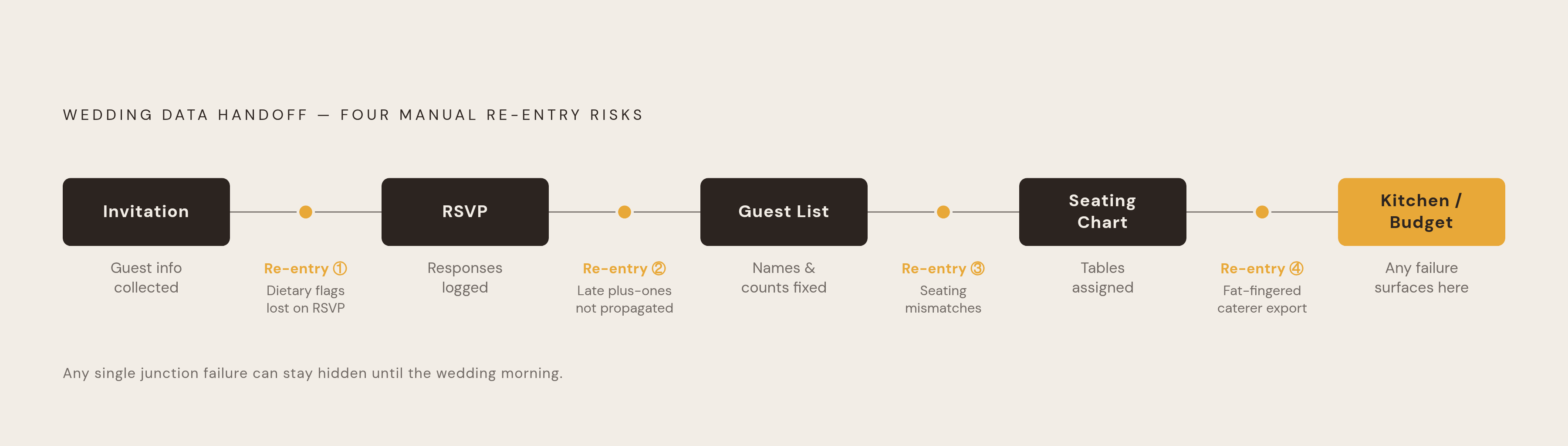
Walking through an actual wedding, the chain looks like this: invitation, RSVP, guest list, seating chart, budget and vendor tracking. Five steps, and at every junction, data has to survive a jump between tools.
Start with invitation to RSVP. Contact details get entered once into whatever sends the invitations, then re-entered into whatever platform is collecting responses, assuming those are two different tools, which they often are.
Then RSVP to guest list. Dietary requirements get collected at the RSVP stage, but they need a human to copy them, by hand, into a separate guest list manager, the one that's actually going to feed the seating chart later. If nobody does that copying carefully, the dietary flag just disappears.
Guest list to seating chart is where things get sharp. Names, plus-ones, and dietary flags all need to already exist inside the seating tool for it to work properly. If the master guest list lives in a different app, any late RSVP change, someone drops out, someone brings a plus-one after all, creates an instant mismatch between what the seating chart shows and what's actually true.
Seating chart to kitchen is its own separate risk. Dietary information has to reach the caterer somehow, and if that requires yet another export or another manual list, that's another point where something gets missed or a number gets fat-fingered.
Budget entries for each vendor need reconciling against actual invoices, frequently in a spreadsheet that lives apart from everything else, and this reconciliation gap produces the errors that surface later. Guest list apps built well are designed to keep information flowing cleanly from the moment a guest gets added to the list until they sit down in their chair, which is the core problem Wedbuild, an all-in-one wedding planning app that keeps RSVPs, seating charts, and budget tracking inside a single connected system, was built around. When that chain breaks anywhere along the line, whoever's planning the wedding becomes the connective tissue, doing by hand what the software should be doing automatically.
Australian weddings carry a specific version of this risk. Interstate and long-distance guests, someone flying in from Perth for a Melbourne wedding, make late RSVP changes far more consequential. A dietary mix-up that might get caught and fixed in a hallway conversation is much harder to correct once that guest has already boarded a flight.
How the "dual app" pattern, discovery tool plus planning tool, became the default for Australian couples
The Australian market for wedding apps splits cleanly down the middle. One lane covers vendor discovery: photographers, caterers, venues, florists, all searchable and comparable. An April 2026 industry comparison puts a single platform's share of Australian vendor coverage at roughly 80%, making it the default starting point for finding suppliers. But that platform's own planning tools, its budget tracker, its guest list feature, stay basic next to what dedicated planning-first apps offer.
That same April 2026 comparison lands on a clear, practical recommendation: most couples should expect to run two apps side by side, one for finding vendors, one for actually planning and budgeting the wedding. It's sound advice. It's also, quietly, a prescription for re-entry. Find a florist through the discovery platform, then manually retype that florist's contact details, quote, and deposit schedule into a separate planning tool. Repeat for every vendor booked.
Global platforms with genuinely strong planning features skew heavily toward the US market, and not just cosmetically. Cash registry features built around US bank accounts and US addresses don't work for Australian couples. Vendor directories built for the US market carry no Australian listings. Even platforms actively building toward an Australian presence have, as of mid-2026, offered little more than a placeholder page announcing something's coming.
Australian couples land in a multi-tool workflow more often than their US counterparts because no single platform built for the US market actually covers their needs end to end. The dual-app pattern is what's left after the gaps get mapped. It's what's left after the gaps get mapped.
What the Australian app field looks like in 2026, and which tools carry which gaps
The April 2026 comparison found that the vendor discovery leader in Australia covers around 80% of local suppliers, and bundles in a free checklist, budget calculator, guest list, seating planner, a free wedding website with RSVP collection, and even a human concierge service at no charge. The business runs on vendor advertising: enquiries are the actual product, and featured placements are paid. It's strong on finding people to hire. It's weak on keeping the planning data connected once you've hired them, so couples routinely export vendor details out and into a second tool.
An Australian-built planning platform, Ivory Lane, takes the opposite approach: it skips a vendor directory and instead offers automated budget forecasting designed to replace a wedding spreadsheet. The company's own site, as of May 2026, states that it bundles budget tracking, a guest list, vendor management, a timeline, checklists, and real-time collaboration between partners, shared editing, assignable tasks, a running decisions log. Its budget benchmarks are pinned to actual Australian cities: roughly $42,000 for Sydney and $38,000 for Melbourne (Ivory Lane, May 2026). There is no native mobile app yet, just a mobile browser experience, with a dedicated app promised later in 2026. Couples find vendors elsewhere, through the discovery platform or word of mouth, then track them inside Ivory Lane. Pricing is free to plan, with a one-off payment unlocking advanced RSVP and invitation features along with unlimited guests, no subscription required, no credit card needed to start (Ivory Lane, April and May 2026).
A genuinely free option built around the guest experience offers a free website, unlimited guests, online RSVP, digital invitations, and photo sharing, with 601 templates by the platform's own count. Its budget allocator, seating chart, guest list manager, and RSVP tracker all come at no cost, and it supports conditional RSVP logic, asking dietary questions only after someone accepts, or hiding certain events from guests who aren't invited to them. The default setup nudges guests toward creating an account; a guest-entry mode removes that step but takes extra configuration to turn on. A custom domain is available for an additional annual fee. Revenue comes from registry sales and affiliate commissions when guests buy gifts through linked retailers, not from charging couples for the core website.
An Australian-built site builder runs two flat, one-time pricing tiers: $99 for online RSVPs and guest management, $199 for a version that adds a seating chart builder, budget calculator, vendor tracker, and timeline generator. Both tiers include 24 months of access, with hosting afterward running $5 a month. Because the planning tools sit inside one paid unlock rather than scattered across separate apps, couples who go with the higher tier cut out a chunk of the handoff friction by default.
A design-forward US platform remains one of the more polished free wedding website builders around, but its seating chart tool is free only up to 15 guests before hitting a $14.99 unlock inside its iOS app, and premium SMS features start at $59.99, with a custom domain from $17.99 a year. It has also dropped Android support, so Android users are stuck planning through a browser.
A UK-built platform brings the most complete free planning toolkit among the UK-origin options: a budget planner, checklist, and guest list all included, wrapped in a polished mobile app with AI-assisted venue matching. Its gap is specific to Australia, where vendor listings thin out fast outside Sydney and Melbourne, and its budget defaults and planning timelines are calibrated for the UK market, not this one.
A platform builds an all-in-one connected system: a guest list that feeds multi-event RSVPs with dietary tracking built in, a wedding website, a visual seating designer, a budget tool with invoice and payment tracking, vendor comparison, checklists, a digital card designer, and a QR-code "find my seat" feature for the wedding day itself. Its design logic goes straight at fixing re-entry: an RSVP update automatically feeds the guest list, which feeds the seating chart, which prints table cards with dietary needs already flagged, no manual reconciliation required at any step. Its gap is the mirror image of the discovery-first platforms: no vendor directory, just a management tool for vendors already found elsewhere, and no native mobile app, though the web version works fine on a phone browser. It suits couples who want every planning layer wired together and don't mind handling vendor discovery as a separate task.
Couples working from older roundups of these tools should expect some of this pricing to have shifted since they last looked.
The hidden cost of "free" tiers: when paywalls appear at the worst moment
Free tiers aren't free forever, and the moment they stop being free is rarely convenient. By the time a paywall appears, the real cost is not the upgrade fee. It's the re-entry cost of migrating every guest, every RSVP, every vendor record already sitting in that platform, or the inertia that keeps a couple paying for or tolerating a tool that no longer fits, simply because starting over feels worse.
The seating chart tool that's free only up to 15 guests turns into an immediate wall for the average couple: a 2026 industry study drawing on more than 10,000 couples puts the average guest count at 117. A couple with 117 names hits that $14.99 unlock before they've placed a single table.
The Australian site builder mentioned earlier is free to design in, but charges between $39 and $199 just to publish, so the free tier functions as a trial, not a usable product on its own. One planning platform in the space runs free to try, then $299 a year to actually use. Another shifted from a one-time purchase model to a US$99 annual subscription, a change that couples relying on older reviews would have no way of anticipating.
The real risk in a free plan was never advertising. It's data portability. Once a couple's guest list, RSVP responses, and dietary records are locked inside a platform they no longer want to pay for, or simply outgrow, the choice is pay up or start the whole list over from scratch.
Check the paywall before entering a single guest, not after the list is built. Work out which features actually matter by the end of planning, seating export, catering-ready dietary lists, guest messaging, and confirm upfront whether the free tier still covers those needs once the guest count climbs past whatever quiet limit the platform has built in.