Wedding App Upsells Hidden Inside Free Planning Dashboards
Free wedding apps monetize couples through hidden upsells once they're locked in.

Free wedding planning apps are not charities. They give couples a checklist, a guest list, and a website at no cost because that free access buys the platform something more valuable: an audience, held captive for the nine to eighteen months most engagements last, long enough to monetize in other ways. Understanding those ways changes how a couple should use the apps, not whether they should.
How free wedding planning apps make money
Three distinct revenue models operate in this space, and each shapes the product differently.
The first is vendor advertising. The app stays free forever, and the business is funded by florists, photographers, caterers, and venues who pay for featured placement and top search results. Every recommendation a couple sees in that directory is shaped by who paid for visibility, not by who does the best work at the best price.
The second is registry commission. The planning tools cost nothing, and the platform takes a cut when guests buy gifts off the couple's registry or contribute to a cash fund through the app. The incentive here points toward purchases, not toward planning.
The third is freemium with feature gates. Basic access costs nothing, but the features couples need most, seating charts, data export, an ad-free wedding website, advanced guest management, sit behind a paid upgrade. Some platforms charge a one-time fee for the unlock. Others run it as a recurring subscription.
Different as these three models are, they share one mechanism. The checklist, the guest list, and the wedding website function as the engagement layer. They are the reason a couple opens the app three times a week for a year. That habitual use is what puts couples in front of vendor placements, upgrade prompts, and upsell screens built directly into the tools they came for. The free tool is the hook. What happens once a couple is hooked depends on which of the three models they have walked into.
What "free" looks like inside each model
Each model has a specific moment where the free promise runs out, or where the platform's interests start to diverge from the couple's, even if no money changes hands.
In the vendor-advertising model, the gate is not a paywall. It is a recommendation layer. A couple browsing a vendor directory never hits a credit card prompt, but every name they see in a featured slot is a paying advertiser, not a result ranked by quality or fit. The platform's entire business is built around that directory, and the couple rarely notices the conflict until after they book, when a friend mentions finding a better photographer for less money outside the app.
In the registry-commission model, the tools themselves are often genuinely good and genuinely free to use. The registry skews toward a specific set of retailers, cash-fund features require a bank account and home address in one particular country, and the vendor directory only covers that same market. A couple outside that market uses a fraction of what the platform offers and hits a wall shaped by someone else's geography for the rest.
In the freemium model, the gate arrives mid-project. A couple enters their full guest list, builds out their wedding website, checks off three months of a checklist, and then discovers that exporting their own guest data, unlocking full seating tools, or removing ads from their website requires payment. It is a familiar shape in free software generally: upload fifty photos, then get told the fifty-first needs an upgrade. The couple has already done the work by the time they see the price.
By the moment the gate appears, the couple has invested weeks of data entry into a platform they picked quickly, often without comparing alternatives, because it was free. Switching costs real time at exactly the point in planning when time is tightest. The lesson carries forward: knowing whether a tool lets you take your own data with you matters more before you start typing than after.
Why Australian couples encounter these friction points differently
The trade-off at the center of the vendor-advertising model, free tools in exchange for tolerating ads and paid placements, only works for a couple if the vendor directory actually covers the vendors they can book.
Most dominant wedding planning platforms were built for those two markets. Their vendor directories, their budget benchmarks, and their default pricing assumptions are all calibrated to US or UK costs and US or UK suppliers. An Australian couple using one of these platforms gets the full upsell funnel, the ads, the featured listings, the upgrade prompts, without the one thing that funnel is supposed to deliver in exchange: a usable list of local vendors.
Budget tools built on US pricing carry that mismatch into the couple's finances directly. A ballpark estimate for catering, flowers, or a venue in a US-built budget calculator reflects US costs, which run at a different level than Australian costs. A couple building a financial plan on that foundation is working from numbers that do not describe their actual market, and won't find out until they're deep into vendor quotes.
The gap appears in specific, structural ways, not as a vague sense that the app "feels American. Cash registry features that demand a US bank account and address are unusable by an Australian couple, full stop, not an inconvenience to work around. Seating tools that exist only inside an iOS app, with full seating arrangements locked behind a subscription, as is the case with at least one seating app on the market, are a hard limit for anyone not on that phone or not willing to pay. Vendor directories with zero Australian listings are missing the product, not offering a thin version of it.
A platform can have excellent editorial content, a well-written blog, even a site localized with Australian spelling and Australian dollar signs, and still not be built for the Australian market. The distinction matters once a couple starts relying on that platform's budget benchmarks or vendor data to make real decisions about real money. Content can be localized cheaply. Vendor relationships and pricing data cannot.
Where siloed free tools most visibly fail couples mid-planning
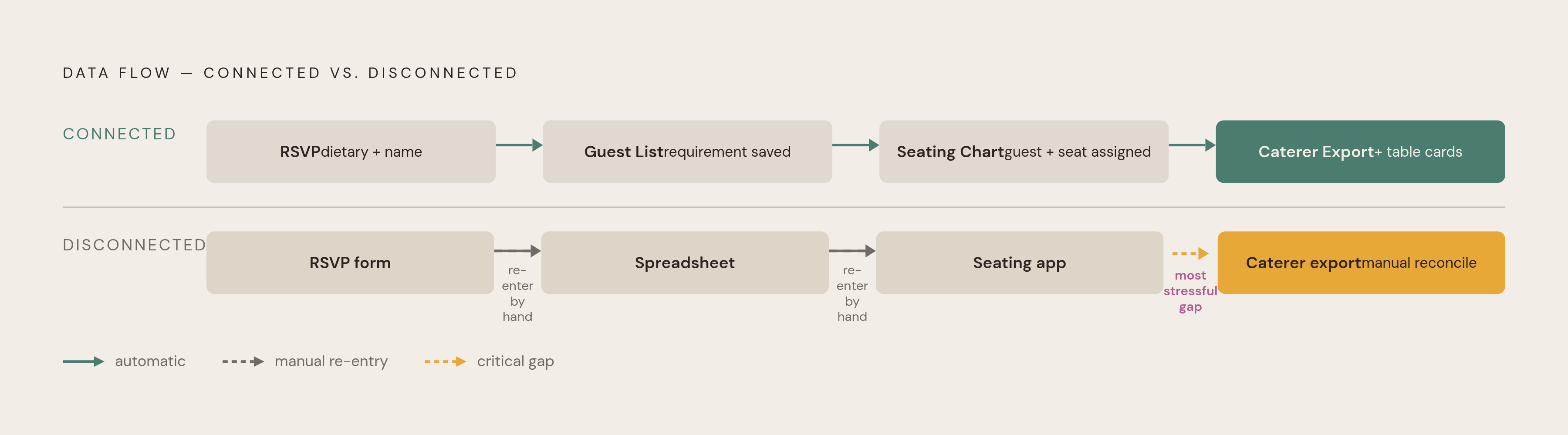
The clearest failure of disconnected free tools appears in the planning back-office, not in vendor browsing.
Seating and dietary management is the clearest case. Guests with severe allergies need to be tracked by name, not counted as a number on a dashboard. A caterer preparing a kitchen for a large wedding needs to know that seat fourteen at table nine belongs to a guest with a tree nut allergy, not that "six guests have dietary requirements" somewhere in the room. A tool that collects dietary data as an aggregate count but cannot attach that data to a named seat has not solved the problem it claims to solve.
The sequence that needs to work, start to finish, looks like this: the RSVP collects a dietary requirement, the guest list carries that requirement by name, the seating chart assigns the named guest with their requirement to a specific seat, and table cards along with a caterer export carry all of it forward to the day of the wedding. Free tools built around a checklist and a pretty website rarely complete that whole chain inside one system.
The caterer export is supposed to go out one to two weeks before the wedding, then get confirmed again once final numbers are locked. A couple managing that handoff across two or three disconnected free tools is reconciling guest names, seat assignments, and allergy notes by hand, manually, in the final and most stressful stretch of planning. That stretch is exactly where the system itself should absorb the reconciliation burden.
Vendor comparison creates a smaller but related headache. Around the two-month mark of planning, couples typically have a folder full of vendor PDFs that cannot be compared side by side. One photographer quotes eight hours of coverage with a second shooter. Another quotes ten hours solo with an album thrown in. One caterer prices per head with service included. Another adds staff, rentals, and a cake-cutting fee buried at the bottom of page four. A platform that surfaces these vendors through its directory has a commercial reason to keep couples browsing for more options, not a reason to help them make sense of what they have already collected.
The objection worth taking seriously: "free tools are fine if you use two of them"
The strongest defense of free platform tools deserves a fair hearing: for discovery and inspiration, advertising-supported platforms do exactly the job they advertise, and pairing two apps, one for finding vendors, one for planning logistics, covers most of what a wedding actually needs.
That defense holds up as far as it goes. A couple whose main need is a shortlist of photographers or a sense of what a reception at a given venue looks like gets real value from a free vendor directory. Once a couple understands the advertising model behind it, it is not a trick. Paid placement is standard practice for ad-supported platforms across almost every industry, and knowing that a "featured" result is a paid result is enough to use the directory sensibly: as a longlist to start from, not a verdict.
The two-app approach runs into trouble at the handoff. Running one app for discovery and a separate app for planning recreates the exact problem these apps exist to solve: replacing a scattered pile of spreadsheets with one clean workflow. A wedding website with a beautiful RSVP page is only as useful as what that RSVP connects to. If the responses land in a separate system, the guest data has to be re-entered by hand into a seating tool, and dietary requirements get reconciled manually the week of the wedding, the couple has rebuilt the spreadsheet problem with better typography.
The real question to ask of any wedding website or RSVP tool is what the RSVP data feeds into once it's collected, and whether it moves automatically or needs to be typed in twice.
The do-it-yourself alternative, building a planning system from scratch in a general workspace tool, carries a similar weakness from a different direction. A Notion-style wedding workspace offers real customization, and a couple willing to build one can shape it exactly to their wedding. But that customization costs many hours of setup before any actual planning gets done, and any AI assistance built into a general-purpose tool has no knowledge of Australian wedding industry norms, standard timelines, or AUD pricing benchmarks. The flexibility lets a couple willing to build one shape it exactly to their wedding. So is the time it costs before it pays off.
What a connected planning system does
The planning failures that compound across a disconnected tool stack, re-entering guest data by hand, reconciling dietary requirements manually, rebuilding a seating chart from a spreadsheet export, are solved by design once every piece of data feeds the next automatically.
The operational version of this looks simple to describe: an RSVP comes in and updates the guest list on its own. The guest list feeds the seating chart. The seating chart prints table cards with dietary legends built in, and gives guests a QR-code seat finder to use on the day. That chain is what a connected system does that a stack of free tools cannot replicate without someone sitting down and reconciling three spreadsheets by hand.
A connected system built this way can still be free to start, with optional paid upgrades rather than a subscription demanded on day one, letting a couple try a budget planner or a seating chart before committing any money. Honest limitations matter here too: a planning-first system built around comparing vendors a couple has already found is not the same tool as a vendor directory for finding them in the first place, and a web-based tool with no native mobile app is a real trade-off for a couple who wants everything on their phone, even if it works fine in a browser.
The budget side of this matters just as much as seating. A connected system that tracks actual invoice amounts and real payments, not rough estimates, gives a couple something closer to the truth about their finances. A budget tracker that shows what was planned is a different tool from one that shows what has actually been committed and paid. One gives a feeling of control. The other gives the real number.
For Australian couples, being built locally matters past branding. It means AUD pricing throughout, planning timelines calibrated to Australian seasons and venue booking windows, and no feature buried in the product that quietly assumes a US address or a US bank account.
Getting real utility from free tools without being steered by their incentives
Understanding how each free model works lets a couple use these tools on their own terms. The goal is matching each tool to the job it is actually good at, not the job its marketing claims it does.
Use vendor-advertising platforms for discovery, not for final recommendations. Browse the directory to build a longlist, then evaluate those vendors independently of the app that introduced them. Get three quotes per major category. Start with venue and date, since the date anchors every other booking decision, then move through celebrant, photographer, caterer, and videographer in that order.
Confirm data export before committing time to any free tool, not after. If a guest list, RSVP responses, or a seating chart cannot be exported on the free plan, that data is sitting in a walled garden, and the time to find that out is day one, not the week switching would be painful.
Check what any wedding website is actually connected to before trusting it with RSVPs. A gorgeous RSVP page that feeds a separate inbox or a spreadsheet off to the side recreates the exact manual-reconciliation problem these tools are supposed to end.