Free Wedding Planning Tools With No Credit Card Required
Compare four types of "free" to find which one actually saves you money.

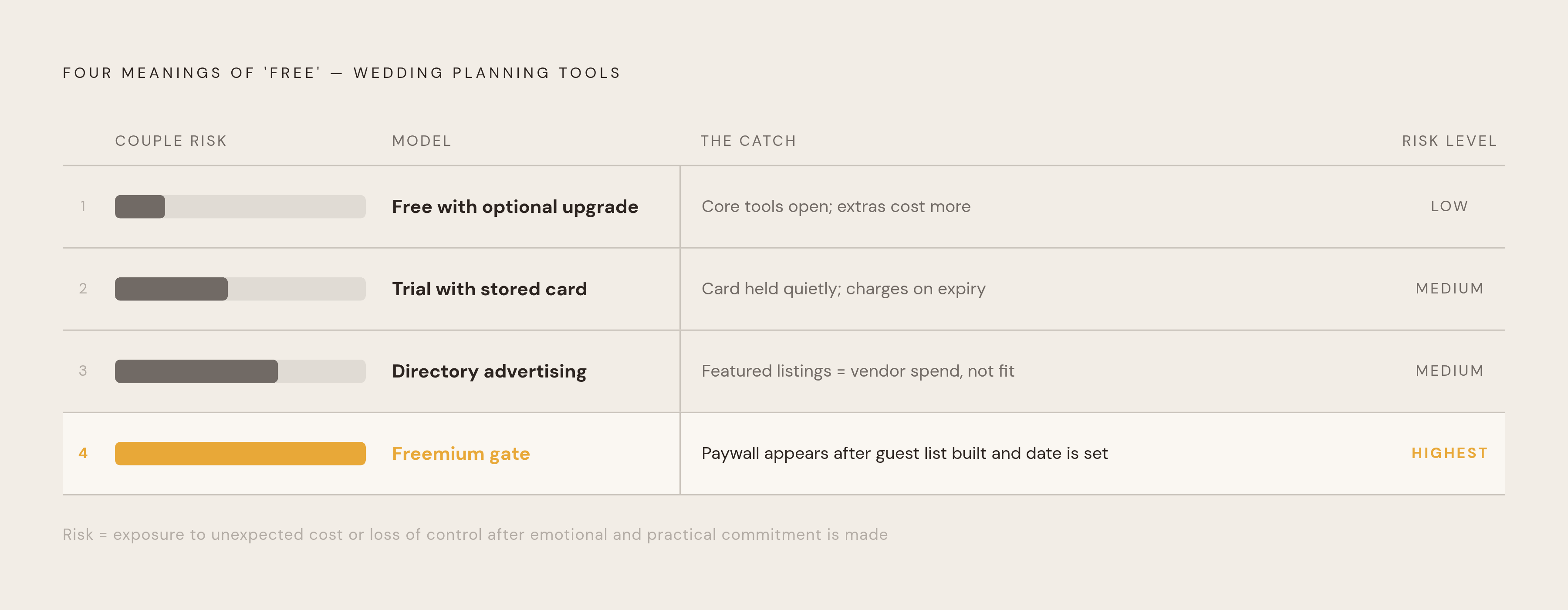
"Free" shows up on at least three different kinds of wedding planning tools, and each one behaves in a completely different way once a couple starts using it. Knowing which version is in front of you decides how much actual planning you get done before something stops working or asks for payment.
The first model is free with an optional upgrade: the planning tools stay open, and the paid parts sit off to the side, like a photo gallery or a custom website address. The second model asks for a credit card at signup, holds it quietly through a trial period, and the moment that window closes or a usage limit is crossed, it charges the card. The third gives out a free account freely, but keeps the features couples reach for most, seating charts, guest messaging, budget forecasting, locked behind a paywall that only becomes visible after the guest list is already built and the wedding date is getting closer. Free wedding directories work on a fourth logic entirely: they run on vendor advertising, not couple subscriptions, so a "featured" listing reflects how much a vendor paid to be seen, not how well that vendor fits a given couple. None of this makes any one model dishonest. It just means the word "free" needs a follow-up question before anyone builds a wedding around it.
What a genuinely free planning stack covers in 2026
The ceiling on what "free" can deliver in 2026 is higher than most couples expect. The right tools let a couple run the full planning arc, checklist, budget, guest list, RSVPs, seating chart, wedding website, and digital invitations, without typing in a credit card number once.
AI tools have pushed that ceiling even higher. You can get budget forecasting, a first draft of vows, stationery layouts, and a plain-language read of a vendor contract for free or close to it, through general-purpose tools built for far more than weddings. Ivory Lane's 2026 review of AI wedding tools puts a number on it: a complete AI planning stack, a free-to-plan Australian planner paired with the free tiers of ChatGPT and Canva, costs almost nothing to run start to finish.
These free tools live in separate products, and nobody built the bridge between them. A couple ends up typing the same guest list into a checklist app, then again into a seating tool, then again into a website builder, because none of those tools talk to each other. That's the real cost of stitching a planning stack together from scratch: hours spent re-entering data that should only need to be typed once. The question worth asking about any free tool is how much of what it offers is actually connected, and which feature turns into a wall the moment a couple needs it most.
The tools that are genuinely free to plan with
No single free tool wins on every front. The ones below hold up as a genuine, no-card-required planning foundation, and the real differences between them come down to how relevant they are to Australian weddings, how connected their features are to each other, and where the paywall actually sits once you hit it.
One platform's free tier covers the wedding website, guest list, RSVPs, digital invitations, and a checklist, plus a seven-day trial of its budget planner and seating chart. Pricing runs in AUD, and none of its features assume a US address, which matters more than it sounds for anyone tired of filling in a US state field that doesn't apply.
Pix Wedding takes a different approach: its free tier opens up a wedding checklist, a budget allocator, a seating chart planner, two separate tools for managing the guest list and tracking RSVPs, a day-of timeline builder, AI-generated vow and speech drafts, and a countdown timer, with no feature gates across any of it. The one place it asks for payment is the photo gallery, where unlimited uploads, full-resolution downloads, and extended access sit behind an upgrade. Its standout feature is QR-code photo sharing: guests scan a code and upload straight from their phone's browser, no app, no account, and the free tier covers up to 20 guest uploads. Its vendor directory is smaller than older platforms, and it has no built-in registry or cash-fund feature.
Ivory Lane is built for the Australian market, and its own 2026 comparison calls it the only Australian wedding planning app with AI-powered budget forecasting, built to replace a wedding spreadsheet. You can start planning for free, with no credit card needed, and a seven-day trial up front. After that trial, a single one-time payment of A$99 unlocks the full planner, budget tracking, guest list, vendor management, timeline, and checklists, all in one place, with built-in collaboration for both partners. A higher A$169 tier adds the wedding website and invitations. There's no subscription and nothing that renews. Its budget allocation adjusts automatically as vendors get booked, and it catches costs couples tend to forget, corkage, cake-cutting fees, gratuities. The platform is newer and smaller than its competitors, it has no native mobile app yet (one is expected later in 2026), and it isn't a vendor directory, so couples still need to find vendors elsewhere. It suits couples who want budget tools built around Australian numbers, if they don't mind handling vendor discovery separately.
Managing Matrimony, also built for Australian weddings, offers a free tier covering the guest list, RSVPs, a wedding website, a budget tracker, and print stationery design. Digital invitations, the seating and floorplan tool, and the day-of runsheet sit behind a paid plan. What stands out is that guest data entered once flows straight into seating, budget, and the runsheet with no re-entry needed, and working wedding coordinators back the platform.
A UK-built free toolset rounds out the field with a free tier covering a budget planner, checklist, guest list, and table planner, delivered through a well-designed mobile app with a smooth onboarding process. It's a strong choice for organizing a wedding day to day, but it isn't built to help Australian couples find vendors. One Australia-facing directory takes the opposite shape: strong for vendor discovery, with expect-a-few-emails-per-enquiry intensity that's useful for comparing options but can get overwhelming fast. Its planning tools stay basic, its budget tracker is a plain list rather than a forecasting tool, and it has no AI layer. It earns its place for finding Australian vendors, so pair it with a dedicated planning tool for everything else.
Pricing and feature details above reflect each platform's position as of mid-2026. Features and prices shift, so check current terms directly on each platform before you commit.
Where free seating chart tools draw the line
Seating charts are where free wedding planning tools most often reveal their paywall, and it's the one feature whose failure shows up in the most visible way on the wedding day itself: guests in the wrong seats, a dietary requirement nobody flagged, a caterer scrambling for answers an hour before dinner.
One UK-built seating tool lets couples design a full floor plan for free, but saving or exporting that plan sits behind a paid tier, and pricing is listed in GBP, USD, and EUR depending on region, so Australian couples should expect the AUD cost to shift with the exchange rate at the time of payment.
Lovely Seating takes a more generous approach to its free tier: one wedding gets a complete seating plan, with unlimited tables, unlimited guests, a drag-and-drop floor plan, guest list management, RSVP tracking, and CSV import, all without a paid upgrade. It also builds in dietary management, storing meal selections, allergies, and other dietary notes against each guest, so that information stays attached to the planning record and can be handed straight to a caterer or planner.
That dietary connection means a caterer or planner can be handed accurate meal, allergy, and other dietary notes straight from the planning record, without separate cross-checking. Collecting structured dietary data (vegetarian, vegan, gluten-free, nut allergy, halal, kosher) at the moment guests RSVP, then having that data flow automatically into the seating export, removes the manual cross-checking that otherwise happens the morning of the wedding, when someone is trying to match a guest list against a caterer's spreadsheet by hand. If a free seating tool handles this natively, it saves you a specific, identifiable kind of stress. A free seating tool that doesn't just moves that same work to the week before the wedding, when there's far less room to fix a mistake.
Using free AI tools to fill planning app gaps
No dedicated wedding planning app is built to write a reading, draft a toast, or lay out a stationery suite, and that's where free-tier AI tools earn their place. They're strongest on tasks that are unstructured and text-heavy, the writing and research work a planner was never designed to hold, as long as couples know where each tool's limits sit.
ChatGPT's free tier handles first drafts well: vows, speeches, RSVP card wording, ceremony scripts, welcome notes, plus brainstorming for themes or reading suggestions, and it can flag unusual clauses in a vendor contract or quote when the text gets pasted directly into the chat. Its hard limit is local accuracy. Ivory Lane's AI tool review warns that it will confidently invent Australian vendor names, prices, and venues that don't exist, so it should never be the source of truth on anything factual or location-specific. It also holds no budget data, no guest list, and no timeline. It writes; it doesn't plan.
Canva's free tier, through Magic Studio, generates a single designed layout, a presentation, a social post, a poster, from one prompt. Carrying that same look across a full stationery suite, save-the-dates, invitations, menus, table numbers, programs, takes Magic Switch and a Brand Kit, not one Magic Design prompt repeated. The free templates hold up well on their own, but the paid Pro tier adds brand kits and background removal. Design is as far as it goes: Canva has no wedding-specific planning features beyond the visual layer.
Perplexity AI's free tier is suited to research questions with a factual answer: typical photographer rates in a given city, what a standard venue hire usually includes. Because it cites its sources, the answer can be checked rather than taken on faith. It holds no budget tracker, no guest list, no timeline, and no vendor tools of its own.
The right way to use all three is as a layer on top of a structured planner, not instead of one. A planning app holds the data: the guest list, the budget, the timeline, the seating chart. AI tools handle the words around that data and the research questions that come up along the way.
What Australian couples are spending
A budget tracker is only as good as the number it measures a couple against. Ivory Lane's 2026 analysis puts the Sydney wedding benchmark at roughly $42,000, and a budget tool calibrated to UK or US spending will set expectations that are already wrong for Sydney, Melbourne, or Brisbane before a couple has contacted a single vendor.
That mismatch runs deeper than converting currency. A planning app built around US or UK norms assumes a different mix of costs altogether, different typical venue hire inclusions, different catering structures, different standard vendor fees, and none of it maps cleanly onto an Australian wedding budget. A free budget tool built around AU numbers tells a couple the truth about their budget, line by line, from the very first vendor deposit, while one calibrated to overseas norms quietly sets them up to go over.