Wedding RSVP Apps Compared for Large Australian Guest Lists
WedBuild connects RSVPs to seating charts without the manual handoffs that break most systems.
A large Australian guest list doesn't break at the RSVP stage. It breaks three steps later, when someone has to turn a long list of "yes" responses into a seating chart the caterer can actually cook from. That's the real test of any wedding planning app, and most of them were never built to pass it.
The real weakness large Australian guest lists expose in most RSVP apps
The easy part of wedding planning software is collecting a yes or no. Any form builder can do that. But the hard part starts after the RSVPs land, and that's where most platforms quietly stop helping.
Picture the common failure: a couple sets up a polished RSVP page, guests respond, and the answers drop into a spreadsheet. Someone then has to read through that spreadsheet and manually total up dietary needs. Those totals get typed, by hand, into a seating chart tool. Then the whole thing gets exported again, reformatted, and sent off to the caterer. Four separate hand-offs, and each one is a fresh chance for a guest's allergy to get lost, miscounted, or seated at the wrong table.
But Australian couples face an extra wrinkle most of these tools never planned for. Plenty of popular RSVP and planning apps are built for the US market first, so you get pricing in US dollars, venue formats that don't match how Australian receptions run, and timelines built around a different hemisphere's wedding season. None of that is fatal on its own, but it adds friction to a process that already has enough.
What the RSVP-to-seating chain requires at each stage
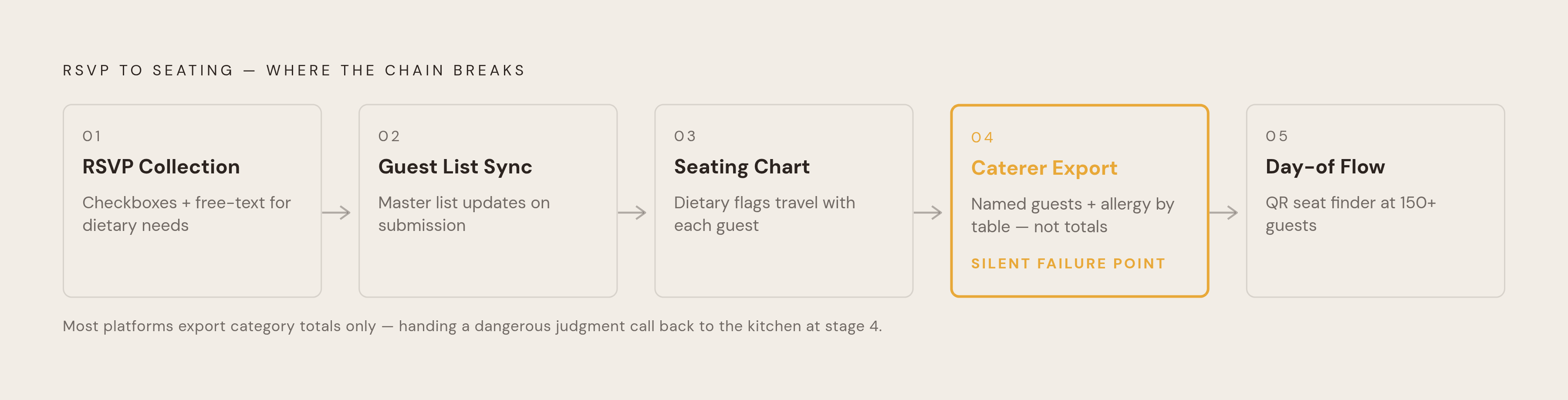
A guest list only stays manageable at scale if the path from RSVP to seating has no gaps. That path runs through five stages, and a weak link anywhere in it drags the whole process back to manual work.
Stage one is RSVP collection, and the detail that matters most here is how dietary information gets captured. Checkboxes, not open text fields. At 150 or more guests, someone has to read every single response by hand to catch what matters if the allergy box is free text, and that defeats the point of collecting the data digitally. Best practice calls for separate checkbox options: Celiac disease kept distinct from a general gluten-free preference, Pescatarian, Shellfish allergy, and Jain vegetarian, plus a free-text "Other or Additional allergies" field for anything a checkbox list can't anticipate. No fixed list covers every possible restriction, so that open field still has a job to do, just a smaller one.
Stage two is guest list sync. When a guest submits an RSVP, the master guest list has to update right away. If a platform simply emails each response to the couple, who then have to copy it into a spreadsheet or a separate guest list themselves, that's email with extra steps.
Stage three is the seating chart itself. It needs to pull from the live, current guest list. Dietary flags have to travel with each guest's record all the way into their assigned seat. This isn't a nice-to-have. Grouping guests with the same dietary needs at the same table is a day-of coordination necessity: servers need to find the vegan guests, the gluten-free guests, and the guests with severe allergies quickly, and that's only possible if those guests are clustered rather than scattered across thirty tables.
Stage four is the caterer export, and it's where a lot of planning tools quietly fail. A summary that gives the caterer category totals, say, "12 gluten-free, 6 vegan, 3 shellfish allergy," is not enough on its own. The export needs to list, by table number, the named guests who have severe allergies. A totals-only report hands a dangerous judgment call back to the couple and the kitchen on the day itself, at the exact moment nobody has time to double-check anything. Timing matters here too: dietary data should go to the caterer two to three weeks before the wedding, with critical allergies or religious dietary requirements confirmed by an actual phone call to the kitchen.
Stage five is day-of guest flow. At 150 or more guests, a printed seating chart at the entrance creates a bottleneck, guests standing around scanning a wall chart for their name while the reception stalls. A QR-based seat finder removes that chokepoint.
Timing around all five stages matters too. For 300 or more guests, invitations should go out 8 to 10 weeks before the wedding, with an RSVP deadline set 5 to 6 weeks out (4 weeks is fine for smaller guest lists). A healthy response curve looks like 30 to 40% of guests responding within the first two weeks, with the large majority in by the deadline. For the remaining stragglers, you need active, individual follow-up.
WedBuild: the platform designed around the full chain
Most platforms treat RSVP collection and seating as separate features that just share one login. WedBuild was built differently: every stage of the chain, from RSVP to seating to caterer export to day-of check-in, runs as one connected system rather than a bundle of modules stitched together after the fact.
The mechanics work like this: a guest submits an RSVP, which updates the guest list automatically. That guest list feeds directly into the seating chart. The seating chart generates table cards printed with dietary legends, and on the day, guests scan a QR code to find their seat instead of checking a printed board at the door. Multi-event RSVPs with structured dietary tracking come standard, so you won't pay extra for them as a bolted-on add-on.
The seating side is built as a visual tool: a drag-and-drop floor plan editor, with table cards that print dietary legends directly from the same system that holds the guest list. There's no export-then-reformat step in between. Budget planning and vendor comparison tools live in the same account as well, so when a guest count shifts, the cost tracking reflects that change without a separate re-entry.
WedBuild was built in Australia by founders who planned their own wedding here, and that shows in details easy to overlook until they're missing: pricing in Australian dollars, no requirement for a US bank account, no feature that quietly assumes an American address. Pricing is straightforward. Weddings up to 50 guests get the core tools free: website builder, RSVP, guest list, and checklist. The Standard plan is a one-time fee that covers unlimited guests, plus a budget planner and a drag-and-drop seating chart. Pro runs A$199 and adds the visual room designer, printable table cards with dietary legends, and the QR Find My Seat tool. Every plan is a one-off payment, not a subscription, but you can add an optional monthly extension once the included two-year access period runs out. New couples get seven days to try the paid features free before they have to decide.
WedBuild has real gaps: there's no vendor directory, so you can compare vendors you've already found, but you can't discover new ones there. There's no native mobile app, but the web platform works well on a phone browser. And its seating tools, while solid, don't go as deep as software built only for seating charts. For large Australian guest lists where the chain itself is the problem, though, WedBuild stands out in this comparison as the platform where that chain was the starting design, not a feature list assembled after the fact.
Ivory Lane: the strongest Australian alternative for budget intelligence and partner collaboration
If you care most about AI-assisted budgeting and real-time collaboration between partners, not a fully synced RSVP-to-seating chain, Ivory Lane is the strongest Australian-built option.
Its budget forecasting runs on Australian city-level pricing benchmarks, covering cities like Sydney, Melbourne, and Adelaide, and it adjusts as vendors get booked. It also flags categories at risk of running over, including the hidden costs couples tend to forget about: corkage, cake-cutting fees, gratuities. Ivory Lane's own research found that 87% of couples planning a 2026 wedding are using at least one AI tool somewhere in their planning process, placing this feature in line with how couples are already working.
Beyond budgeting, Ivory Lane includes a guest list with dietary requirements and meal selections, vendor payment tracking with reminders, and partner-shared editing with assignable tasks, a decisions log, and real-time sync between both partners' edits. An upgrade unlocks cinematic invitation videos paired with Smart RSVP collection. The platform is free to try for a week, and the upgrade itself is a one-off payment rather than a subscription.
By its own account, Ivory Lane is a newer platform with a smaller user base. Its vendor marketplace doesn't launch until late 2026, so for now it's a planning tool rather than a discovery tool. There's no native mobile app yet, but one is expected later in 2026. And the RSVP-to-seating chain doesn't sync as tightly as WedBuild's: dietary data and seating aren't automatically linked in the same way. Ivory Lane fits you if you want real AI-driven budget help and genuine shared ownership of planning between partners, and you don't mind finding vendors through a separate directory in the meantime.
Invyt: the specialist for multi-event and multicultural guest lists
Some weddings aren't one event with one guest list. South Asian celebrations, multicultural weddings, and multi-day receptions often involve several events, each with its own invite list, and that's a problem the all-in-one platforms generally don't solve well. Invyt was built specifically for it.
Its core feature is a single-page, multi-event RSVP: each event gets its own guest list and its own RSVP form, but guests only interact with one page, and the couple sees every event's responses on one dashboard. WhatsApp and SMS sharing come built in, along with QR codes for printed invitations and bilingual invitation support, and these details matter if you're a diaspora family coordinating guests across different countries and time zones.
In practice, that means a Mehndi and a reception become two separate headcounts tracked in the same account, each with its own dietary data and attendance numbers, rather than one guest list that can't tell the two events apart. Invyt fits couples with five or more events, multilingual guest lists, or diaspora families where tracking who's coming to which event is the hardest part of the whole process.
Choosing between these options by guest list size and complexity
Two questions decide which platform fits: how many guests are confirmed, and whether the wedding spans multiple events or needs a multilingual guest list.
For smaller guest lists with standard dietary needs, WedBuild's free plan covers the whole chain, website, RSVP, guest list, and checklist, with the seating chart available on the Standard plan if the wedding grows past what a simple list can handle. A specialist tool isn't necessary at this scale.
For 150 to 300 or more guests at a single event with real budget complexity, WedBuild Pro at A$199 adds the visual room designer (QR Find My Seat is already part of Standard). You can pair that with Ivory Lane for its budget forecasting and partner collaboration tools too. The two platforms don't overlap in any way that causes friction.
For any guest list size that spans multiple events or needs multilingual support, Invyt handles the multi-event RSVP layer that neither of the other two platforms is built for. Running WedBuild alongside it covers the seating chart and caterer export, which is the gap Invyt leaves open.
Before committing to any platform, including ones outside this comparison, ask directly: does a dietary response entered at RSVP show up automatically on the seating chart and in the caterer export, or does someone have to manually move it there? If a manual step appears anywhere in that path, the platform hasn't actually connected dietary responses to the seating chart and caterer export, it's just made the RSVP form prettier.
Getting the caterer handoff right regardless of which platform you use
Even a platform that connects every stage perfectly can still fail at the very last handoff if the data reaches the caterer in the wrong shape, at the wrong time, or missing the detail that actually matters.
The caterer summary needs four things: total confirmed guest count, entrée counts broken out by option, dietary restrictions grouped by type with guest counts attached, and a separate, named list of guests with severe allergies that includes their table number. Category totals alone aren't enough. A kitchen working from "8 shellfish allergies" with no names or tables attached is a kitchen that has to guess, and guessing with allergies is not a risk worth taking on someone's wedding day.
Timing matters as much as content. Send the dietary export two to three weeks before the wedding, well ahead of the week of the event. If it involves a critical allergy or a religious dietary requirement, follow that export with an actual phone call to confirm the kitchen's protocols directly.
Format decides how much work this takes. If a platform exports a CSV with checkbox columns, sorting and counting by category is simple. But if a platform exports free-text fields, you have to manually read through every single response, which is exactly the bottleneck structured dietary fields are meant to prevent.
The last physical handoff happens at the reception itself: table cards printed with dietary legends, paired with a QR-based seat finder, let guests find their own seats and let servers see dietary needs at a glance, without a couple standing at the entrance on their wedding morning manually directing traffic.
Run every stage of that chain correctly, structured RSVPs, automatic seating sync, a named dietary export, printed table cards, and a couple arrives at their wedding with the caterer already briefed and every guest already seated. That's the actual point of building the chain in the first place: not a feature checklist, but a wedding morning where the logistics are already handled, and the only thing left to do is show up.